




If you’re choosing a technology for a new website, you’ve probably seen the debate: Astro vs WordPress.
Astro is newer. It’s fast, developer-friendly, and built to send as little JavaScript as possible.
WordPress is mature and flexible, with an ecosystem built over more than twenty years.
So which one should you use? That’s not quite the right question.
A better one is: what do you expect from the website once it’s live? Who will update it, and how often? Will you need e-commerce, forms, bookings, or other integrations? Do you have developers in-house? How much control does your marketing team need? And what happens when the person who built the site is no longer around?
Those answers lead to a better decision than any feature comparison. Astro is the right choice for some projects. WordPress is the right choice for others. Sometimes the best answer is WordPress for content and Astro for the front end.
A quick note on bias: CodeCaste is a WordPress agency, so we have a view. Where Astro is the better fit, we’ll say so.
Astro vs WordPress at a glance
| Astro | WordPress | |
| Performance | Very good by default | Good to very good when well built |
| Content management | Needs a CMS added | Built in |
| Ease of editing | Depends on the CMS you add | High |
| Developer control | High | High |
| Plugin ecosystem | Smaller | Very large |
| Ecommerce | Needs extra architecture | Mature, with WooCommerce |
| Security | Fewer exposed parts on static sites | More parts to keep updated |
| Maintenance | Fewer server parts, but code dependencies to update | More updates, but built-in tools help |
| SEO | Strong technical control | Strong control, plus editor-friendly tools |
| Client independence | Set by the CMS and workflow | High |
| Best suited to | Performance-focused, developer-managed sites | Flexible, content-driven business sites |
Astro and WordPress aren’t direct equivalents. WordPress is a CMS and website platform. Astro is a web framework. That difference explains most of the table.
Astro and WordPress are different things
What Astro is?
Astro is a web framework built for content-focused websites. By default, it turns your components into plain HTML and sends no JavaScript to the browser
When part of a page needs to be interactive, such as a menu, slider or form, you add JavaScript to that part only. Astro calls these small interactive parts “islands”. Developers also choose when each island loads. client:load loads it straight away, client:idle waits until the browser is free, and client:visible waits until the visitor scrolls to it.
Astro also has “server islands”, which let a mostly static page load a personalised part, such as a cart count, from the server on demand. Read more in Astro’s islands documentation.
For a visitor, that means less code to download and less work for the browser. It suits pages built from headings, copy, images, forms, calls to action, blog posts, and service information.
Astro doesn’t come with a WordPress-style admin area. Your content has to live somewhere. That could be Markdown files (Astro’s content collections give these a structure), a headless CMS, an API, or WordPress itself.
So “we’re moving from WordPress to Astro” usually means more than a new look. It changes how the whole site is built and managed. That can be a smart move. It adds cost and risk if the WordPress site was already doing its job.
What WordPress is?
WordPress gives you an admin area, an editor, user roles, a media library, revision history, and a huge ecosystem of themes, plugins, and integrations. A typical build might include:
- Gutenberg or a page builder
- Custom post types and ACF fields
- WooCommerce
- SEO tools
- Forms, bookings and memberships
- CRM integrations
- Analytics and multilingual features
Your marketing team can manage all of it from one dashboard.
WordPress also powers a very large share of the web. W3Techs reported on 6 October 2026 that WordPress runs 40.1% of all websites, and 58.6% of sites where the CMS can be identified. Astro was at 0.2% and 0.3%. W3Techs lists Astro in its CMS table even though it is a framework, so read this as a rough sign of size, not a like-for-like contest.
That size matters. If you need a feature, someone has probably built it. And almost any web agency can take over a WordPress site. The trade-off is that all this functionality means more parts to maintain.
Performance: Astro has a head start
If performance is high on your list, Astro deserves a close look. It sends HTML to the browser and loads JavaScript only where a page needs it. That gives developers a fast starting point for marketing sites, SaaS sites, landing pages, and documentation.
The real-world data points the same way. In HTTP Archive’s April 2026 data, as reported by Search Engine Journal, about two in three Astro sites passed Core Web Vitals. For WordPress, it was about one in two. The same report notes that Astro sites tend to be simpler, so the gap may narrow as a site gets more complex.
But you’ll often see this claim: “Astro is fast. WordPress is slow.” It’s too broad. We’ve seen badly built sites on every platform, and we’ve seen very fast WordPress sites.
A WordPress site is usually slow for practical reasons:
- A heavy theme or an overloaded page builder
- Plugins that load scripts and styles on every page. Our guide on why WordPress plugins slow your site shows how to find them.
- Oversized images
- Third-party scripts such as chat widgets, ad pixels, and tag managers
- Weak hosting
- Missing or badly set-up caching
Changing platform doesn’t fix these if the same habits come along. An Astro site can be slow too. Large images, many third-party scripts, and heavy React or Vue islands set to client:load all add weight.
If your WordPress site is slow for the reasons above, a rebuild in Astro will change things. But if a carefully built WordPress site already passes Core Web Vitals, speed alone is a weak reason to rebuild.
Astro gives you a stronger performance baseline. It doesn’t make every site fast. For a step-by-step fix of a slow WordPress site, see our WordPress speed optimisation playbook.
What caching can and can’t fix
A well-set-up WordPress site doesn’t build every page from scratch for every visitor. Page caching saves a finished HTML copy of each page and serves that copy. Add a CDN and a persistent object cache such as Redis or Memcached, and the server has far less work to do. WordPress explains these layers in its caching documentation and optimisation guide.
Caching has limits. Cart, checkout and account pages are different for each visitor, so page caches skip them. WooCommerce’s own documentation says to exclude Cart, My Account and Checkout from caching, and it lists cookies, such as woocommerce_items_in_cart, that tell caches to step aside. Logged-in users, membership content and personalised pages work the same way.
On those pages, speed comes from the server, not the cache: good hosting, object caching, tidy database queries, and few plugins hooking into checkout. Our guide to speeding up a WooCommerce store covers this.
This matters for the Astro comparison. Astro can make your content pages very fast, and server islands can handle small personalised parts. But it won’t speed up a WooCommerce checkout, because that still runs on WordPress or another back end.
Measure with Core Web Vitals, not platform labels
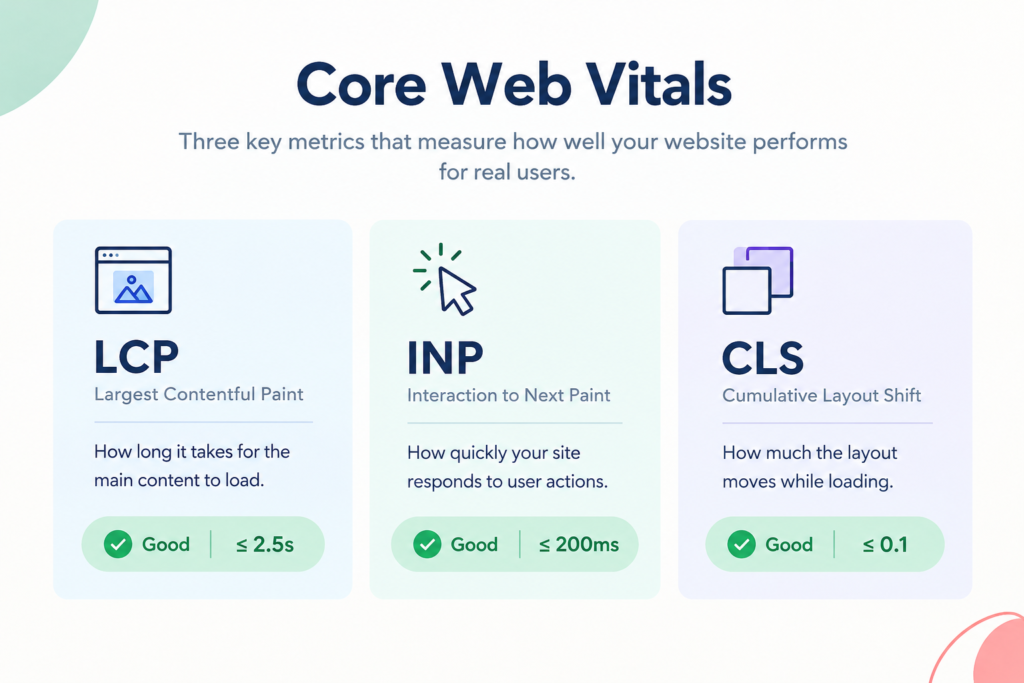
Google’s Core Web Vitals show what visitors actually feel:
- LCP (Largest Contentful Paint): how fast the main content appears. Good is 2.5 seconds or less.
- INP (Interaction to Next Paint): how quickly the page responds to a tap or click. Good is 200 milliseconds or less.
- CLS (Cumulative Layout Shift): how much the layout jumps while loading. Good is 0.1 or less.
Google assesses these at the 75th percentile of real page loads. See web.dev’s Web Vitals guide. Third-party scripts often hurt INP, on any platform.
Don’t judge a platform by one PageSpeed score. A WordPress page scoring 52 and an Astro page scoring 96 tells you those two pages differ. It doesn’t tell you why. Find the cause first: scripts, images, server response, or caching. We cover this in how to pass Core Web Vitals in WordPress and fixing a slow Largest Contentful Paint.
Who edits the site, and who owns it?
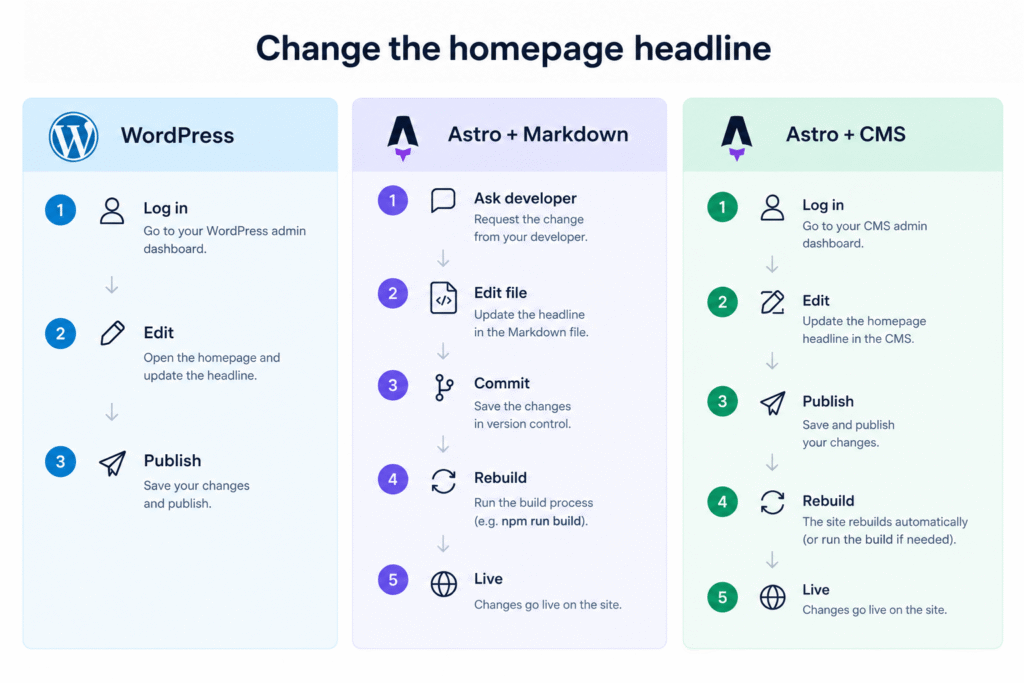
Here’s a simple test. What happens when your marketing manager wants to change the homepage headline?
On a typical WordPress site, they log in, change the headline, and publish. No developer needed.
With Astro, the answer depends on where the content lives:
- Markdown files: a developer edits the file, commits the change, and the site rebuilds.
- A headless CMS: your team edits in a dashboard. Publishing triggers a rebuild.
- An agency-managed site: the agency makes every change.
Astro gives you a lot of freedom, but somebody has to design that content workflow. For a software company with developers on staff, that’s easy. For a 20-person professional services firm that publishes every week, we’d think hard before giving up the simplicity of WordPress.
Now look past launch day. Six months in, you may need to add a service, publish a case study, change a CTA, add a team member, build a landing page or update your contact details. With WordPress, your team can do most of that. With Astro, it depends on the CMS you chose and how the site was built.
If your agency manages the site for you, Astro works well. If your marketing team wants to own it, WordPress makes that easier.
Developer dependency
Astro can reduce plugin and server upkeep, but that doesn’t remove the need for a developer. The work moves.
- WordPress: core, plugins, theme, hosting, and security.
- Astro: framework, dependencies, CMS, Git, deployment, and a developer.
For a technical team, that’s fine. For an owner who wants to make changes without calling anyone, it may not be. Before choosing Astro, ask: how comfortable are we with a developer being involved in future changes? If the answer is “not very”, look hard at WordPress.
What if your agency disappears?
It’s an uncomfortable question, but worth asking. With WordPress, there are agencies and developers everywhere. Astro has a growing developer community, but a much smaller one. It also has a new owner: in January 2026, the Astro team joined Cloudflare, and Astro remains open source.
That’s not a reason to avoid Astro. It’s a reason to check how the project is handed over. Whichever platform you choose, make sure you own:
- The domain
- The hosting account
- The source code and Git repository
- The CMS account
- Deployment accounts
- API keys and integrations
- Documentation
A good agency makes handover possible on any technology.
Maintenance and security
A WordPress site has more parts to keep healthy: core, plugins, themes, PHP, the database, admin accounts, and integrations. That doesn’t make WordPress insecure. A well-kept WordPress site is secure. It means you need a routine for updates, backups, monitoring, plugin review, and access control. WordPress can apply minor core updates automatically, and you can switch on auto-updates for plugins and themes. For the signs that a site is overdue for care, see 10 warning signs your WordPress site needs maintenance
A static Astro site serves plain files. The public site has no admin login, no PHP, and no database to attack. That’s a real advantage.
It isn’t risk-free, though. Npm dependencies, the build pipeline, the CMS, APIs, form services, and hosting accounts can all have weaknesses. If you go headless with WordPress, the WordPress admin still exists, so it still needs protecting.
The maintenance work doesn’t vanish when you move to Astro. It changes shape.
SEO: neither platform ranks better on its own
Astro gives developers full control over HTML, metadata, URLs, structured data, and rendering, with no plugin to fight. WordPress can do the same, and its SEO plugins give marketers a friendlier way to manage titles, descriptions, and schema.
Can Astro rank better than WordPress? Yes.
Can WordPress rank better than Astro? Also yes.
Neither platform writes your content, builds your internal links, or earns backlinks.
Astro gives developers a clean technical foundation. WordPress gives marketers an accessible SEO workflow. Both can deliver excellent results when the site is built and managed properly.
Ecommerce, memberships and plugins
This is where Astro finds it hardest to compete. Say a client asks for an online store with payments, customer accounts, product variations, coupons and inventory. WooCommerce gives you a mature starting point. The same goes for memberships, learning management, event registration, advanced forms, bookings, directories, job boards, and multilingual sites. Each has a WordPress solution you can install and configure.
Astro can support all of these. But you’re more likely to be assembling a custom architecture. You can build a headless storefront on top of WooCommerce, which has a Store API for this. But you then rebuild the cart, checkout and account pages yourself, and WordPress still runs behind them.
For a simple marketing site, that flexibility is rarely needed. For a highly customised product, it may be exactly what you want. If you need a store, see our WooCommerce development services.
Page builders, Gutenberg and ACF: how the site is built matters
Most businesses aren’t choosing between “Astro” and “WordPress”. They’re choosing a workflow. For example:
Figma → WordPress → ACF and Gutenberg → client editing → maintenance
or:
Figma → Astro components → CMS → Git → deployment
On WordPress, there are two common ways to build.
- ACF and Gutenberg blocks. Developers build structured, reusable blocks with tidy markup. Clients can edit safely inside them. This gives a good balance between developer control and client flexibility.
- Page builders such as Elementor and Divi. These make visual editing easy. But they usually add more markup, CSS, and JavaScript than custom blocks. You can reduce this by switching off unused widgets and stopping assets from loading on every page. Always test your real pages with Lighthouse rather than trusting a builder’s own claims.
Astro takes the other route. You control every line of output, but you need more development work up front. If clients want visual editing, you need a CMS with live preview.
Neither route wins on its own. The right one depends on who will use the system every week.
What does it cost over three years?
Hosting is only one line on the bill. A fairer question is: what will this site cost to build, maintain and change over three years
| Cost area | WordPress | Astro + separate CMS | WordPress + Astro (headless) |
| Design and build | Theme or custom build, plugin set-up | Custom components, content model, CMS set-up | Both: WordPress content model plus Astro front end |
| Hosting | One WordPress host | Static host, plus CMS hosting if it isn’t a SaaS | WordPress host plus static host |
| Licences and subscriptions | Premium plugins, themes | CMS plan, third-party services (search, forms) | Premium plugins plus front-end services |
| Updates, backups, security | Core, plugins, theme, PHP, backups, monitoring | Dependencies, framework upgrades, CMS, deployments | Both sets of updates, plus the connection between them |
| Changes after launch | New pages and posts handled by your team | Code changes by a developer, or CMS edits | Content edits by your team, layout changes by a developer |
| Performance work | Caching, images, plugin and script review | Image handling, third-party script review | Both |
| Integrations (forms, CRM, ecommerce) | Plugins or custom code | Built or bought separately | Rebuilt on the front end, or kept in WordPress |
| Training and handover | Familiar for most editors | New workflow to learn and document | New workflow plus two systems to document |
| Your team’s time | Low for routine edits | Higher if edits need a developer | Low for content, higher for layout changes |
Quick Tip: To use it, copy the table into a spreadsheet and add your quotes. Then work out: build cost + (hosting + licences + maintenance + changes) × 3 years. Add the cost of your team’s time. If a marketing manager can build a landing page without a developer, that’s real value. If a reusable Astro component system makes future builds faster, that counts too.
Which is best for each type of website?
Small business website. We’d lean towards WordPress. If it’s a 10–30 page site and the owner or marketing team will make regular changes, WordPress is hard to beat. Astro still works well if the site is stable and an agency manages it.
SaaS marketing site. Astro is worth serious thought. Product pages, landing pages, documentation, blog posts, case studies and pricing pages fit its component model and performance approach.
Ecommerce. We’d usually start with WordPress and WooCommerce. Ecommerce isn’t only a front-end problem. You need products, inventory, payments, orders, customers, promotions, tax rules, and integrations. If a mature solution exists, there’s a good reason to use it.
Blog or publication. It comes down to the team. A small technical team with a light workflow may love Astro. A publication with writers, editors, and frequent publishing will probably prefer WordPress.
Agency website. Either can work. If developers control the site and speed matters most, Astro is compelling. If marketing staff create and edit pages, WordPress is more convenient.
Membership or community site. We’d lean towards WordPress. Once a site has accounts, subscriptions, and gated content, it behaves like an application, and WordPress’s ecosystem becomes valuable.
Documentation site. Astro is a strong option. Fast static pages and component-based development suit documentation well.
What about agencies managing dozens of client sites?
If you run an agency, don’t just ask which platform your developers prefer. Look at your whole delivery model:
- How quickly can your team build sites?
- How easily can clients edit them?
- How much maintenance does each site create?
- How easy is it to train new developers?
- How easy is it to take over an existing project?
- How much recurring support work do you want?
And most importantly, what do your clients actually ask for? If most need WordPress editing, WooCommerce, ACF, Gutenberg, Elementor, forms, integrations, and ongoing support, WordPress is probably aligned with your business. If you build highly customised marketing sites for companies with technical teams, Astro may fit better. The technology should fit your business model, not the other way round.
If you’re a smaller agency that wants a reliable build partner, reach out to our team
Using WordPress with Astro (headless WordPress)
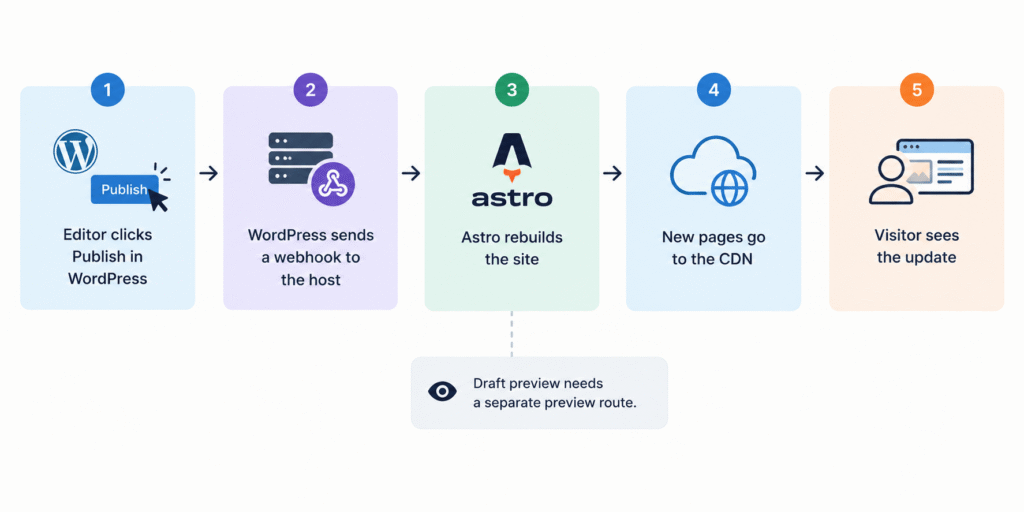
This is the part many comparisons skip. You don’t have to choose. You can use WordPress as the back end and Astro as the front end:
Editor → WordPress → API → Astro build → CDN → visitor
Astro’s docs include a guide to headless WordPress with Astro. WordPress provides a REST API by default, which exposes posts, pages, media, and taxonomies. WPGraphQL is a separate plugin that adds a GraphQL API.
Two defaults are worth knowing. The REST API is open to unauthenticated requests by default, so be careful what you publish through it. And custom post types must be exposed to the API before Astro can read them. ACF fields need switching on too: ACF has a “Show in REST API” setting, and WPGraphQL’s ACF add-on has a “Show in GraphQL” setting.
How publishing works
Astro builds pages ahead of time. When an editor hits publish, WordPress calls a deploy hook on your host. The host rebuilds the site, and the new page goes live once the build finishes. On large sites, build time grows with the number of pages. You can handle that by rendering some routes on demand instead of at build time.
What you gain
- Editors keep the WordPress dashboard, roles, media library and revisions.
- Visitors get a fast, mostly static front end.
- The WordPress admin can sit behind restricted access, away from the public site.
- The front end can be deployed separately from the CMS.
What gets harder
- Previews. Editors expect to preview a draft. In a headless setup, you build a preview route on the Astro side that makes authenticated requests for draft content, using on-demand rendering.
- Plugins that output front-end code stop working by default. That includes form plugins, sliders, popups, membership gating and WooCommerce’s cart and checkout. You rebuild them or replace them.
- SEO data. Some SEO plugins can pass titles, descriptions, canonicals, and schema through the API. Astro still has to output them. Check every tag in the rendered HTML.
- Forms. Submissions need to go to a form service, a serverless function, or a WordPress endpoint. You also need to handle spam protection and notifications.
- Search. WordPress search isn’t on the static site. You need a front-end option such as Pagefind or a search service.
- Redirects and 404s. If a redirect plugin handled these, move them to your host or Astro config.
- Images. Decide whether WordPress, Astro, or your CDN handles resizing. Keep the alt text.
- Page-builder content. Content built in a visual builder usually doesn’t translate cleanly through an API. Headless works best with structured Gutenberg and ACF content.
- Two systems. You now run two sets of hosting, updates, and monitoring. When something breaks, you need to know which side to check.
When it’s worth it
Headless suits large, content-heavy sites with a development team that is comfortable with both systems. Think of a publisher with many editors, or a site with hundreds of articles where front-end speed matters. It isn’t worth it for a five-page local business site. Headless isn’t automatically better. It’s one more tool.
Should you move your existing WordPress site to Astro?
Be careful here. If someone says, “Your WordPress site is slow, so rebuild it in Astro”, ask why it’s slow first:
- Is the hosting poor or overloaded?
- Are there plugins loading assets on every page?
- Is the theme or page builder producing too much code?
- Are the images too large?
- Are third-party scripts hurting performance?
- Is caching set up properly?
If the answers point to fixable problems, moving to Astro may be an expensive way to solve something that didn’t need a new platform. Our WordPress performance optimisation service starts with this kind of audit.
We’d seriously consider Astro when:
- The site is mostly content and marketing pages.
- Speed is a real business priority.
- You have developers who know the stack.
- You don’t rely heavily on WordPress plugins.
- You’re ready to design a new content workflow.
- The current WordPress build is hard to maintain.
We’d probably stay with WordPress when:
- The site already works well, and your team likes editing it.
- You depend on plugins, or you run WooCommerce.
- The site needs frequent visual editing.
- Your speed problems can be fixed without a rebuild.
The risks of migrating
Any rebuild can move your rankings, even WordPress to WordPress. A move to a new platform adds risk because URLs, templates, metadata, and redirects all change. Before you move:
- Crawl the old site and list every URL. Export titles, meta descriptions, headings, canonicals, and schema.
- Keep URLs the same wherever you can. Where a URL must change, set a one-to-one 301 redirect to the closest matching page, not to the homepage.
- Carry over SEO data: titles, meta descriptions, canonical tags, structured data, image alt text, and hreflang tags if the site is multilingual.
- Rebuild the XML sitemap and robots.txt. Keep the staging site set to noindex, then remember to remove that setting at launch. It’s a common mistake.
- Test forms and tracking: analytics, ad conversions, the cookie banner, and CRM connections.
- Check internal links after the build, and avoid redirect chains.
- Test Core Web Vitals on the real templates, not just the homepage.
After launch, submit the sitemap and watch Search Console for crawl errors, indexing drops, and 404 spikes. Compare rankings and leads each week for the first few weeks.
There are non-SEO risks too: lost plugin features, a new editing workflow, retraining, and a change in who owns the code. These don’t show up in a PageSpeed score. Sometimes the best migration is no migration.
So which should you choose?
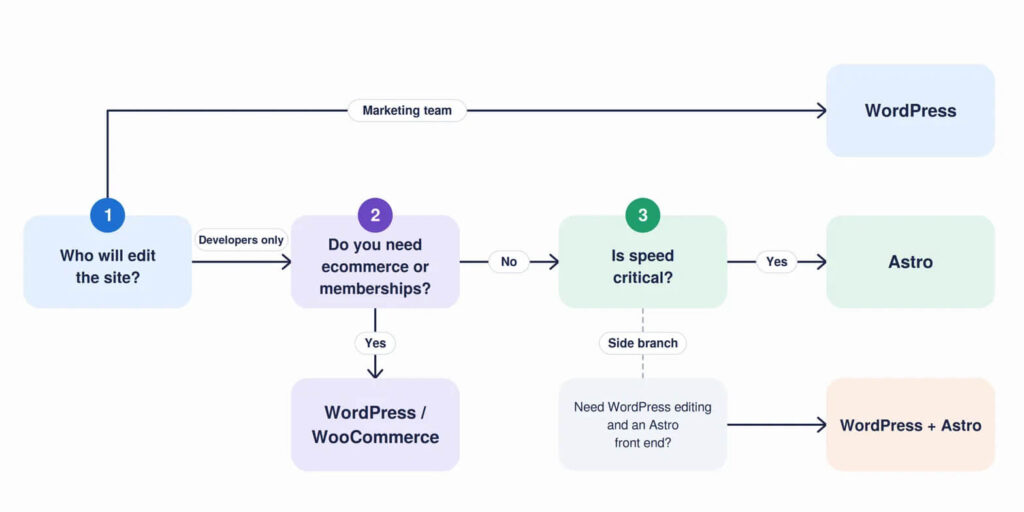
Choose Astro when your site is mainly a marketing or content experience, your development team owns the technical side, speed matters, and you don’t need WordPress’s plugin ecosystem.
Choose WordPress when your marketing team needs to manage content, the site needs integrations or business features, you run ecommerce or memberships, or you want a platform almost any agency can take over.
Consider WordPress with Astro when you need WordPress’s editing experience and Astro’s front end, and the project is complex enough to justify running both.
Don’t choose Astro because it’s new. Don’t choose WordPress because it’s popular. Your business needs change more slowly than technology trends, and the site you launch today may still be generating leads in five years.
So the most useful question isn’t “Which platform is better?” It’s “Which platform will be easier for our business to live with?”
Not sure which fits your project? Talk to CodeCaste, and we’ll tell you honestly, even if the answer is Astro.
Frequently Asked Questions
1. Is Astro better than WordPress?
Not across the board. Astro is strong for performance-focused, developer-managed sites. WordPress is stronger when content management, plugins, integrations and non-technical editing matter.
2. Is Astro faster than WordPress?
Astro has a strong performance architecture because it renders to HTML by default and adds JavaScript only where needed. In HTTP Archive’s April 2026 data, more Astro sites passed Core Web Vitals than WordPress sites. A well-built WordPress site can also be very fast, so the quality of the build matters. See is Astro really faster than WordPress?
3. Is Astro good for SEO?
Yes. It gives developers excellent control over HTML, metadata, structured data and performance. WordPress is also excellent for SEO. Neither guarantees rankings.
4. Is Astro cheaper than WordPress?
Not always. Hosting can be cheaper, but you may need a separate CMS, more development and specialist support. WordPress may cost more to maintain, but its ecosystem can cut development time. Compare the three-year cost, not the hosting bill.
5. Can Astro replace WordPress?
For some sites, yes. But Astro is a front-end framework, not a CMS, so you still need somewhere to manage content. See can Astro replace WordPress?
6. Can I use WordPress with Astro?
Yes. WordPress can act as a headless CMS while Astro handles the front end. Astro’s docs include a guide for it. Plugins that output front-end code, such as forms and sliders, need to be rebuilt.
7. Should I migrate my WordPress site to Astro?
Only with a clear reason. If your site is slow because of hosting, plugins, a page builder or poor development, fixing the existing build is often the better move. If you do migrate, plan redirects and SEO checks first.
8. Will moving to Astro hurt my SEO?
It can if URLs, metadata and redirects aren’t carried over carefully. With a proper redirect map and launch checks, you can reduce the risk. Rankings can shift after any rebuild.
9. Is WordPress still relevant in 2026?
Yes. W3Techs shows it on about 40% of all websites, and well over half of sites with a known CMS.
10. Is Astro good for business websites?
Yes, especially marketing sites, SaaS sites, documentation and landing pages where performance and front-end control matter.
11. Which is better for an agency, Astro or WordPress?
It depends on the agency’s delivery model. WordPress suits clients who edit their own sites and rely on plugins. Astro suits development-led agencies building customised, performance-focused sites.
12. Is headless WordPress with Astro worth it?
Sometimes. It works well for large or technically advanced projects. It adds complexity, so a small business site usually doesn’t need it.