




If you’ve been researching modern website development, one question keeps popping up: Is Astro really faster than WordPress?
The honest answer is that there’s some truth behind it.
Astro is designed around a performance-focused architecture. Its components render to HTML by default, and interactive components can be loaded as separate “islands” instead of sending JavaScript for the entire page.
But this comparison is often presented in a misleading way.
Astro is not automatically faster than every WordPress website. A slow WordPress website doesn’t automatically mean you need to rebuild it with Astro.
It really depends on how each website is built, what it needs to do, where it’s hosted, and how it handles things like JavaScript, images, and caching.
So let’s take a more practical look at the question.
Why Does Astro Have A Reputation For Being Fast?
Astro’s performance story starts with its architecture.
By default, Astro components render to HTML rather than running a client-side JavaScript runtime in the browser. If a component doesn’t need to be interactive, Astro doesn’t need to send its JavaScript to the visitor.
This is the idea behind Astro’s Islands Architecture.
Imagine a normal business website containing:
- Header
- Navigation
- Hero section
- Text
- Images
- Testimonials
- FAQ
- Contact form
- Image slider
Most of those elements don’t need JavaScript to display.
Maybe the navigation needs some JavaScript.
Maybe the slider does.
Maybe the contact form has some interaction.
Astro lets the developer keep the majority of the page as HTML and load JavaScript only for the components that actually need it.
Its client directives also allow developers to control when interactive components are loaded.
That is a very sensible approach for content-heavy websites.
And it is one reason Astro can achieve excellent frontend performance.
But this doesn’t mean WordPress is slow?
This is where the conversation usually becomes too simplistic.
A lot of WordPress websites are slow.
That’s true.
But WordPress itself isn’t the only thing responsible for that.
WordPress’s official performance guide highlights several factors that affect website speed, including hosting, themes, plugins, images, caching, and software configuration.
Consider two WordPress websites.
Website A
It uses:
- A heavy multipurpose theme
- 40 plugins
- Large uncompressed images
- Several third-party scripts
- Poor hosting
- No page caching
- Unnecessary JavaScript
- Poorly optimised fonts
Website B
It uses:
- A lightweight custom theme
- A small number of well-built plugins
- Optimized images
- Proper caching
- A CDN
- Minimal JavaScript
- Good hosting
- Clean database queries
Calling both of them “WordPress websites” doesn’t tell you much about their actual performance.
They are completely different implementations.
So when someone says:
“Astro is faster than WordPress.”
We’d ask:
Which WordPress website?
A fast Astro website has an architectural advantage
There is still an important point in Astro’s favour.
If you’re starting from scratch and the website is primarily a content-driven website, Astro gives developers a performance-oriented starting point.
Its default approach is to render components to HTML and avoid sending unnecessary client-side JavaScript.
That matters because JavaScript isn’t free.
The browser needs to download it, parse it, compile it and execute it.
And this becomes particularly noticeable on lower-powered devices or slower connections.
Astro’s approach is essentially:
Don’t make the browser do work that doesn’t need to happen in the browser.
That’s a good principle.
But it isn’t an exclusive feature of Astro.
A good WordPress developer can follow the same general principle by keeping the frontend lightweight and avoiding unnecessary scripts.
The difference is that Astro makes this approach much more central to the framework’s architecture.
What actually makes a WordPress website slow?
In our experience, the answer is rarely simply:
“Because it’s WordPress.”
There are usually several things happening.
1. Too much JavaScript
A website may load scripts for:
- Sliders
- Popups
- Analytics
- Chat widgets
- Forms
- Cookie banners
- Tracking
- Animation libraries
- Page builders
- Marketing tools
Some of these may be necessary.
Some may not.
And some may be loaded on every page when they’re only needed on one.
This can hurt frontend performance.
Astro’s architecture makes it easier to avoid shipping JavaScript for components that don’t need it in the first place.
But you can also audit and remove unnecessary JavaScript from a WordPress site.
2. Poor image optimisation
A 4 MB hero image can cause more damage to a page than the choice between Astro and WordPress.
This is why performance work should start with the actual page rather than the technology label.
WordPress has improved image loading over the years. For example, WordPress 6.3 introduced a feature that helps browsers load the main image on a page sooner, improving how quickly the page appears to load.
But you still need to upload sensible images and configure the site correctly.
A framework can’t magically make a huge image small.
3. Poor hosting
A well-built website can still perform badly if the server is overloaded or poorly configured.
WordPress’s performance guide highlights the importance of good hosting and server performance. It also recommends using caching, CDNs, and server-side optimisations to improve website speed.
That’s why comparing Astro on great hosting with WordPress on cheap shared hosting doesn’t give you a fair picture of their performance.
You aren’t comparing the platforms. You’re comparing two completely different setups.
Caching changes the WordPress performance conversation
This is one of the biggest things people overlook.
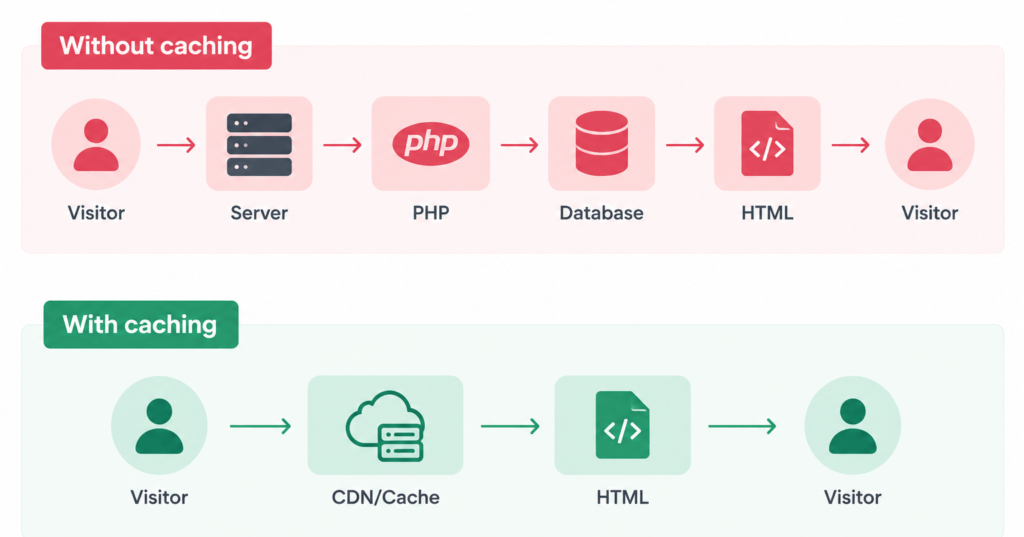
A WordPress website doesn’t necessarily need to execute the entire WordPress stack every time a visitor requests a page.
Caching can store generated pages and serve them as static files.
WordPress’s developer documentation specifically describes page caching as a way to serve static versions of posts and pages, reducing the processing required from the server.
You can also use:
- Browser caching
- Server caching
- Object caching
- CDN caching
- Full-page caching
The exact setup depends on the website.
But the important point is this:
A WordPress website can be heavily cached.
That changes the performance characteristics considerably.
So is Astro really faster than WordPress?
Here’s the honest answer:
Astro can be faster, particularly when compared with a poorly optimised WordPress implementation.
But you cannot reasonably conclude that:
Astro website = fast
and
WordPress website = slow
without looking at the actual implementations.
Astro has a strong architectural advantage for minimising unnecessary client-side JavaScript.
WordPress gives developers many ways to optimise caching, images, hosting, plugins and frontend assets.
Both can produce fast websites.
Where Astro has a genuine advantage
There are certain situations where we’d give Astro a clear advantage.
Content-heavy websites with limited interactivity
Think:
- Blogs
- Documentation websites
- Marketing websites
- Editorial websites
- Brochure websites
- Content-focused landing pages
If most of the page is text, images and simple UI, Astro’s HTML-first approach fits the problem very well. Astro itself positions the framework for content-driven websites such as blogs, marketing sites and ecommerce.
You don’t need a lot of JavaScript for these websites.
Astro’s architecture takes advantage of that.
Where WordPress can still be very fast
A properly built WordPress website can perform extremely well.
For example, imagine a custom WordPress site with:
- Lightweight theme architecture
- Carefully selected plugins
- Optimized images
- Proper font loading
- Minimal third-party scripts
- Full-page caching
- CDN
- Good hosting
- Clean database
- No unnecessary page-builder bloat
There is no reason to assume that a website will automatically be slow simply because WordPress is underneath it.
WordPress’s performance guide recommends improving site speed through caching, CDNs, image optimisation, better plugin management, database optimisation, and good hosting.
The implementation matters. A lot!
Don’t use PageSpeed as a platform popularity contest
This is another mistake we see quite often.
Someone runs a WordPress website through PageSpeed Insights.
It scores 52.
They run an Astro website.
It scores 96.
The conclusion becomes:
“Astro is better.”
Not necessarily.
You’ve learned that those two pages performed differently under that particular test.
That’s useful information.
But you haven’t proved that Astro is inherently faster than WordPress.
The better question is:
What caused the difference?
Maybe the WordPress page has:
- Too many scripts
- Poor image sizing
- Render-blocking CSS
- Slow server response
- A large DOM
- Third-party tracking
- Poor caching
Those are problems you can investigate.
If you can fix them, you may not need to change platforms at all.
Core Web Vitals matter more than the technology label
When you’re trying to decide whether a website is fast enough, look at the actual user experience.
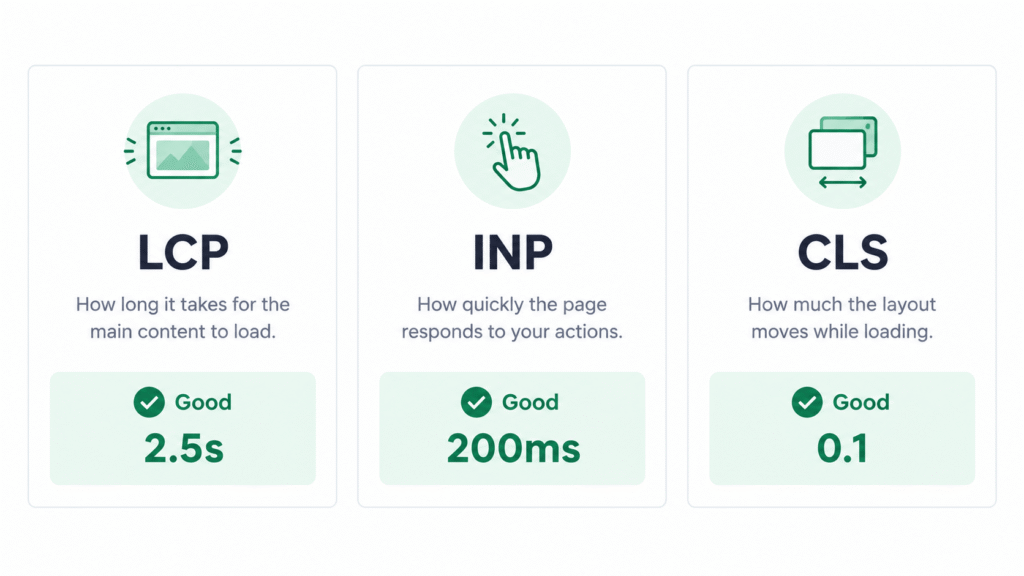
Google’s Core Web Vitals focus on three important aspects of the experience:
- LCP — how quickly the main content loads
- INP — how responsive the page is to interaction
- CLS — how stable the layout is while loading
These metrics are much more useful than saying:
“This is an Astro website.”
or:
“This is a WordPress website.”
A fast website is one that gives visitors a good experience.
The framework is only one part of that.
What about Time to First Byte?
TTFB is another metric that often gets mixed into the discussion.
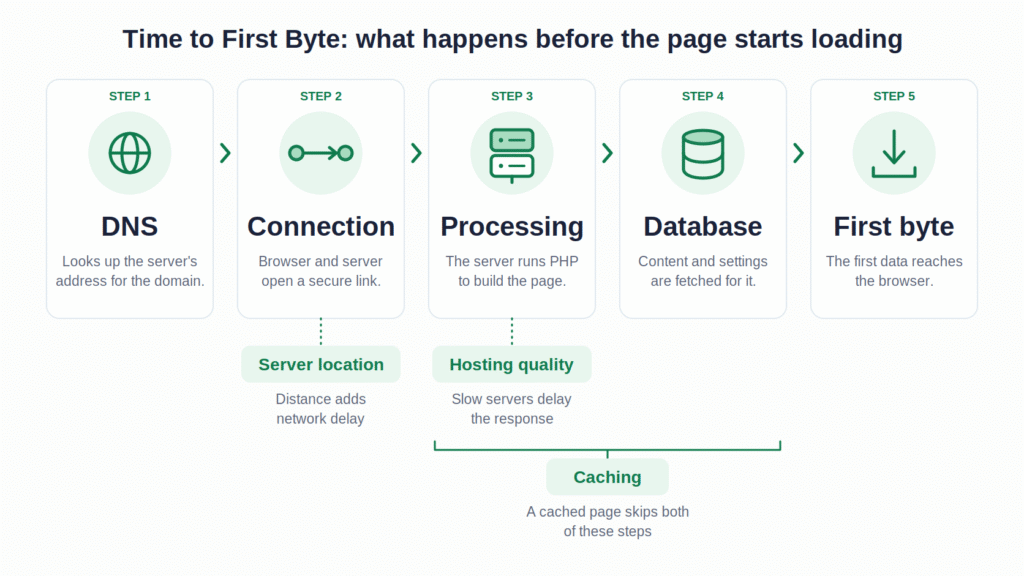
It measures how long it takes for the browser to receive the first byte of the response from the server.
A lot can influence this:
- Server location
- Hosting
- Network latency
- Caching
- Server processing
- Database queries
- Application architecture
WordPress’s performance documentation specifically discusses caching and persistent object caching as ways of reducing server and database work that can affect response times. WordPress Developer Resources
Astro can pre-render pages at build time, meaning the HTML can already exist before a visitor requests it. Astro also supports server-rendered pages when needed.
Again, this gives Astro a strong performance model.
But the right comparison depends on how the WordPress site is configured.
The biggest mistake: comparing a bad WordPress site with a good Astro site
This happens all the time.
A developer takes a slow WordPress website built years ago with a heavy theme, dozens of plugins and poor hosting.
Then they build a clean Astro site from scratch.
Of course the Astro site is faster.
But the useful lesson isn’t:
“WordPress is slow.”
The useful lesson is:
“The old WordPress implementation was slow.”
That’s an important difference.
You might be able to rebuild that same website in WordPress with a much cleaner architecture and solve most of the performance problems without changing the CMS.
And the reverse is also possible
Astro doesn’t guarantee a perfect score.
You can still build a poorly performing Astro website.
You can add:
- Large images
- Too many third-party scripts
- Heavy client-side components
- Poorly designed API calls
- Unnecessary interactivity
- Large JavaScript bundles
Astro’s architecture makes it harder to accidentally ship unnecessary JavaScript, but developers can still make architectural choices that add complexity or work to the browser.
The framework gives you a strong starting point.
It doesn’t replace good development.
What if your WordPress site is slow today?
This is where we’d be careful about recommending a migration.
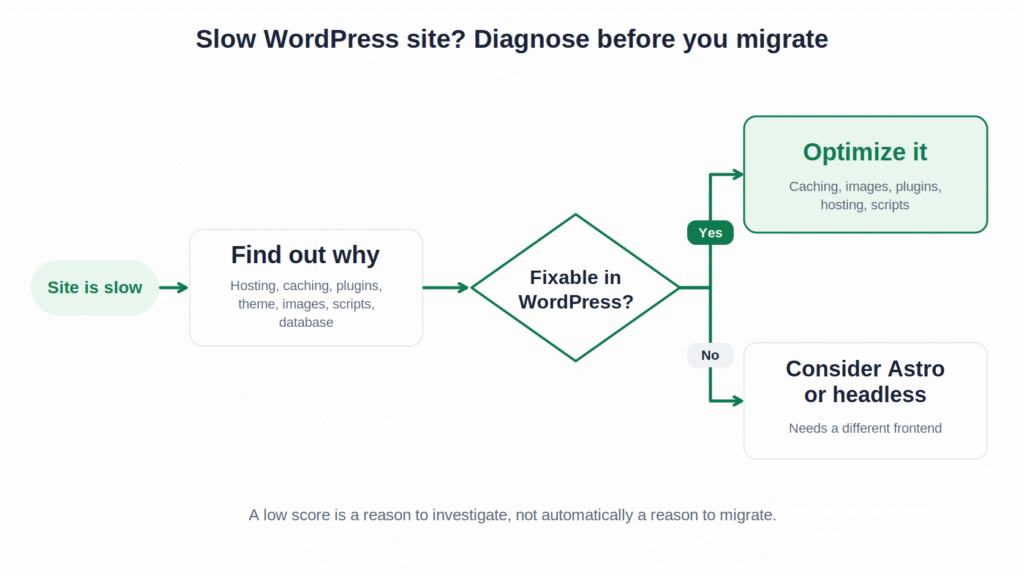
If you have a slow WordPress website, don’t immediately say:
“We need Astro.”
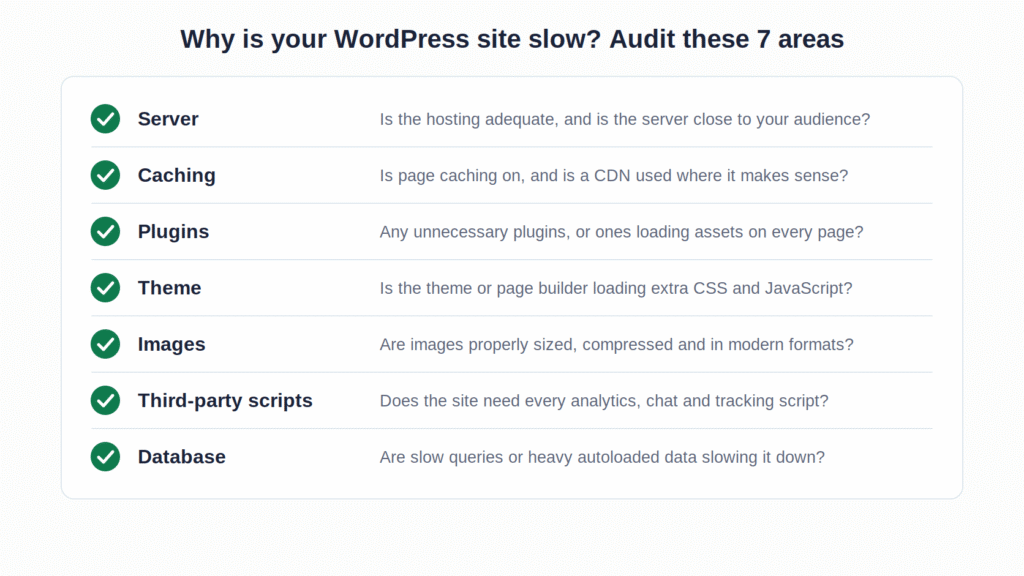
First, find out why the website is slow.
We’d look at:
Server
- Is the hosting adequate?
- Is the server overloaded?
- Is the site geographically far from its main audience?
Caching
- Is page caching configured?
- Is a CDN being used where it makes sense?
- Is object caching useful for the site?
Plugins
- Are there unnecessary plugins?
- Are some plugins loading assets everywhere?
- Are any plugins causing expensive database queries?
Theme
- Is the theme loading unnecessary CSS and JavaScript?
- Is the page builder generating excessive markup or assets?
Images
- Are images properly sized and compressed?
- Are the right formats being used?
Third-party scripts
- Does the site really need every analytics, chat, advertising and tracking script currently installed?
Database
- Are expensive queries or excessive autoloaded data affecting performance?
WordPress’s own optimisation guidance recommends investigating these areas before treating the platform itself as the problem. WordPress Developer Resources
When would we actually recommend moving to Astro?
There are cases where a migration makes sense.
For example, you may have a website where:
- The frontend needs a different architecture
- Most pages are content-driven
- JavaScript needs to be kept very low
- Developers want tighter control over the frontend
- The existing WordPress implementation is difficult to maintain
- Content can be managed through a suitable CMS
- The business is comfortable with a developer-led workflow
In those cases, Astro can be a very good choice.
But notice that “our PageSpeed score is low” isn’t on that list by itself.
A poor performance score is a reason to investigate.
It isn’t automatically a reason to migrate.
What if the website needs WordPress?
This is where the decision becomes more interesting.
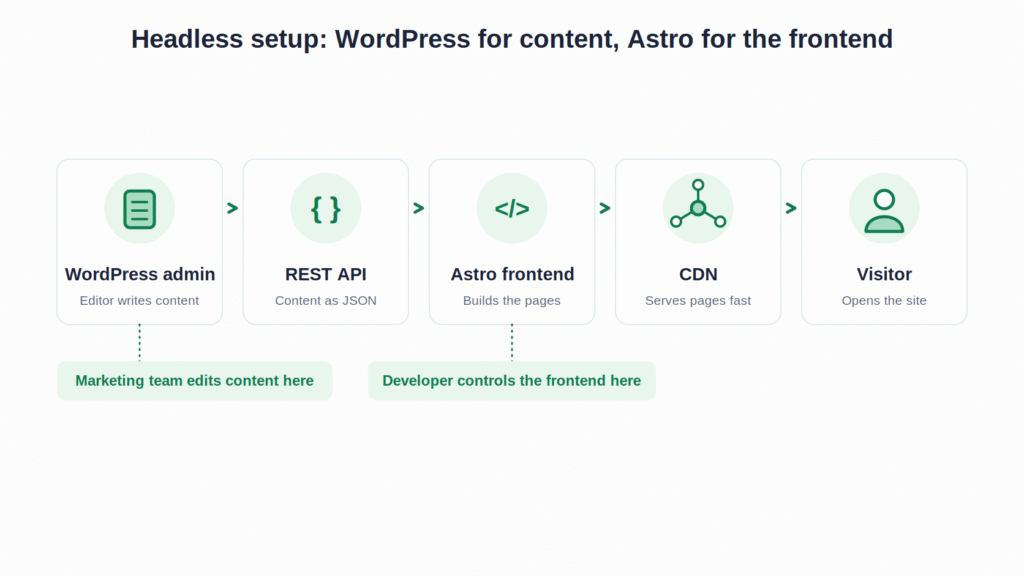
Suppose your marketing team publishes content every week.
They manage:
- Blog posts
- Landing pages
- Case studies
- Services
- Team profiles
- Images
And they need to make changes without waiting for a developer.
You may still choose Astro.
But now you need to decide what CMS will sit behind it.
That could be WordPress.
Astro officially supports using WordPress as a headless CMS, with content retrieved through the WordPress REST API. Docs
So another architecture becomes possible:
WordPress for content + Astro for frontend.
That can be a powerful setup.
But it also introduces another layer of development and maintenance.
Which brings us back to the original question.
Faster isn’t always better
This sounds strange coming from someone who works on website performance.
But it is worth saying.
If two websites both provide an excellent experience to visitors, the one with the slightly better benchmark score isn’t automatically the better business decision.
Imagine:
Website A
Loads extremely quickly.
But every content change requires a developer.
Website B
Loads slightly less quickly.
But the marketing team can publish content, create landing pages and update the website without developer involvement.
Which one is better?
There isn’t a universal answer.
It depends on the business.
That’s why I prefer looking at performance alongside the rest of the website architecture.
The answer we’d give a client
If someone asked me:
“Is Astro really faster than WordPress?”
We’d say:
Astro is built for speed, especially for content-heavy websites that don’t need much JavaScript in the browser. But that doesn’t mean every Astro website will be faster than every WordPress website.
A well-built Astro website can be extremely fast.
A poorly built Astro website can still have performance problems.
A poorly built WordPress website can be slow.
A well-built WordPress website can also be fast.
So don’t choose the platform based on the assumption that one is automatically fast and the other is automatically slow.
Look at the actual requirements and the actual implementation.
Frequently Asked Questions
1. Is Astro faster than WordPress?
Astro can be faster, especially for content-driven websites that need very little JavaScript. However, a well-optimized WordPress website can also deliver excellent performance.
2. Why is Astro considered a fast framework?
Astro renders components to HTML by default and sends JavaScript only for components that need interactivity. This helps reduce unnecessary JavaScript in the browser.
3. Does Astro guarantee a 100 PageSpeed score?
No. Astro provides a performance-focused architecture, but large images, heavy JavaScript, third-party scripts and poor development choices can still affect performance.
4. Which is better for business websites, Astro or WordPress?
stro is a strong option for mostly static websites that prioritize performance and use a developer-led workflow. WordPress may be better for businesses that need frequent content updates, built-in content management and a broad plugin ecosystem.
The bottom line
Yes, Astro can be faster than WordPress.
But that’s not the whole story.
Astro has a genuine architectural advantage when it comes to minimizing client-side JavaScript. Its default approach renders components to HTML and lets developers selectively add interactivity where it is needed. Docs
WordPress, meanwhile, gives developers many ways to improve performance through caching, CDN delivery, image optimization, plugin management, database optimization and good hosting. WordPress Developer Resources
So if someone tells you:
“Astro is fast and WordPress is slow.”
We’d challenge that statement.
A better way to put it is:
Astro is designed to make a fast frontend easier to build. WordPress gives you more variables to manage, but a well-built WordPress site can still be very fast.
And that distinction matters.
Because if your WordPress website is slow today, the first question shouldn’t be whether you should move to Astro.
It should be:
“Why is this website slow?”
Once you know the answer, you can decide whether the problem can be fixed within WordPress or whether a different architecture is actually justified.
If you’re deciding between the two platforms, read our complete guide: Astro vs WordPress: Which Is Better for Your Business Website? It looks beyond speed and compares content management, SEO, security, maintenance, cost, integrations and what happens to the website after launch.