





You log in to your wordpress site one morning, and something feels off. Your website homepage is showing a pharmaceutical ad. Or a visitor texted you saying your site redirected them to a casino site.
If any of that sounds familiar, you have already lived through a wordpress hacked situation, and it is not a fun place to be. A WordPress-hacked site can lead to data loss and SEO damage.
The frustrating part is that most site owners had no idea the attack was coming, or that their site was even vulnerable. And that is by design. Attackers do not announce themselves. They move quietly, plant code, and either cause immediate visible damage or sit dormant for weeks, waiting. Many wordpress hacked cases happen due to outdated plugins.
Here is a stat worth sitting with: WordPress powers roughly 43% of all websites on the internet. That scale makes it an extraordinarily attractive target.
Automated bots scan millions of WordPress sites every day, looking for specific wordpress vulnerabilities to exploit. Most attacks are not personal. They are industrial.
In this article, we break down the actual wordpress hacking methods attackers use, the warning signs you should not ignore, and the concrete steps you can take to lock your site down.
Whether you run a blog or a business-critical eCommerce store, this is worth reading before something goes wrong.
How Your WordPress Sites Actually Get Compromised
Before we get into the specifics, it helps to understand why wordpress security is such a challenge in the first place.
WordPress itself, when kept updated and properly configured, is reasonably secure. The problem is the ecosystem around it.
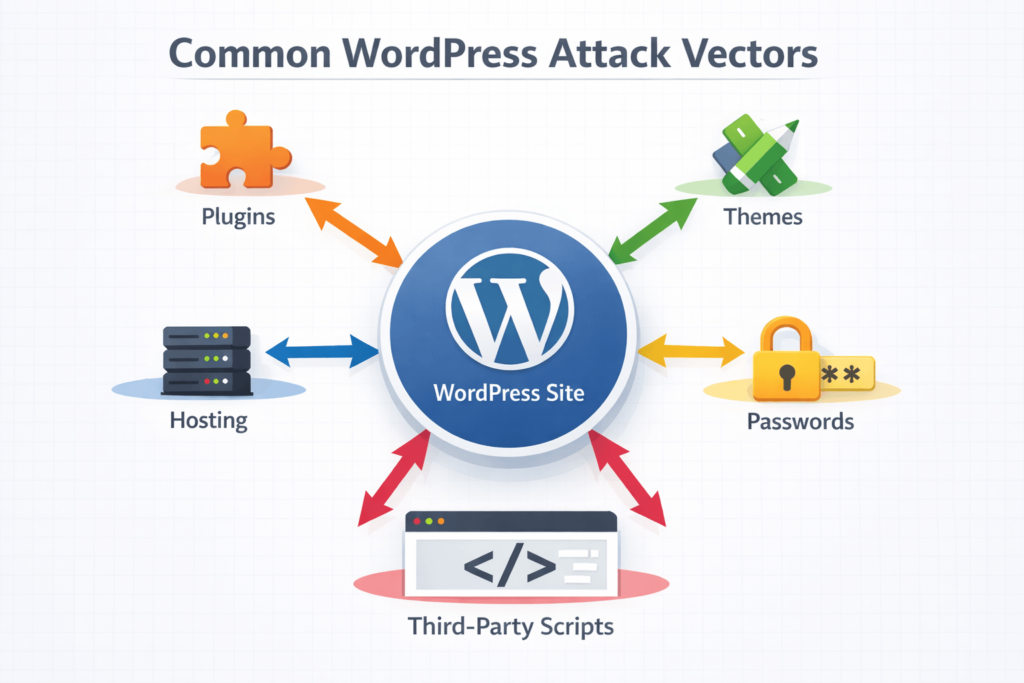
The average WordPress site runs 20+ plugins, a premium theme, and a hosting environment that may or may not be hardened. Each one of those layers is a potential door.
Attackers also do not manually probe your site while sipping coffee. They run automated tools that scan thousands of sites per hour, testing known exploits against known software versions.
If your site is running a vulnerable plugin from three months ago, a bot will find it before you remember to update it.
| QUICK CHECK: Head over to your WordPress admin dashboard right now. If you see update notifications for plugins or themes that you have been ignoring, those are open invitations. Go update them. |
WordPress Vulnerabilities: The Main Entry Points
Not all attack vectors are created equal. Here are the main ways attackers find their way in:
1. Outdated or Poorly Coded Plugins
Plugins are responsible for the majority of wordpress vulnerabilities found in the wild. The WordPress plugin repository alone has over 60,000 plugins. Some are brilliantly maintained. Others were last updated in 2019 and have known security holes documented publicly on sites like WPScan.org.
A vulnerable plugin does not need to be popular to be exploited. Bots specifically look for installations of plugins with known CVEs (Common Vulnerabilities and Exposures). If you have it installed and not updated, you are exposed.
- Examples of plugin vulnerabilities: unauthenticated SQL injection, stored cross-site scripting (XSS), arbitrary file upload, and privilege escalation.
- A single plugin with a critical severity rating can give an attacker full admin access to your site.
2. Vulnerable or Nulled Themes
Premium themes obtained from unofficial sources (commonly called “nulled” themes) are a major wordpress security risk. These pirated copies frequently come pre-loaded with malicious code. You think you are getting a $60 theme for free. You are actually giving a free backdoor entry to the hackers.
Even legitimate themes that are not kept updated can contain vulnerabilities, though this is less common than with plugins.
3. Weak or Reused Passwords
Brute force attacks are exactly what they sound like. Attackers hammer your login page with username and password combinations until something works. Default usernames like “admin” combined with weak passwords make this trivially easy.
Credential stuffing is a related attack where attackers use username/password combos leaked from other data breaches. If you reused your email password on your WordPress admin account, and that email was in a data breach, attackers already have your credentials.
4. Insecure Hosting Environments
Shared hosting comes with a trade-off. If a neighbouring site on the same server gets compromised and the hosting environment is not properly isolated, attackers can sometimes pivot across accounts.
This is less common on quality-managed WordPress hosting providers, but it happens on budget shared hosts.
Outdated PHP versions on the server side, misconfigured file permissions (files set to 777, for example), and exposed wp-config.php files all fall under hosting-level wordpress vulnerabilities.
5. Exposed wp-admin and xmlrpc.php
By default, your WordPress login page lives at yoursite.com/wp-admin and yoursite.com/wp-login.php. Every attacker knows this. Leaving these publicly accessible without any additional protection means they are a constant target for brute force attempts.
The xmlrpc.php file is a legacy API endpoint that is frequently exploited for brute force attacks and DDoS amplification. Unless you specifically need it, it should be disabled.
6. Third-Party Scripts and Supply Chain Attacks
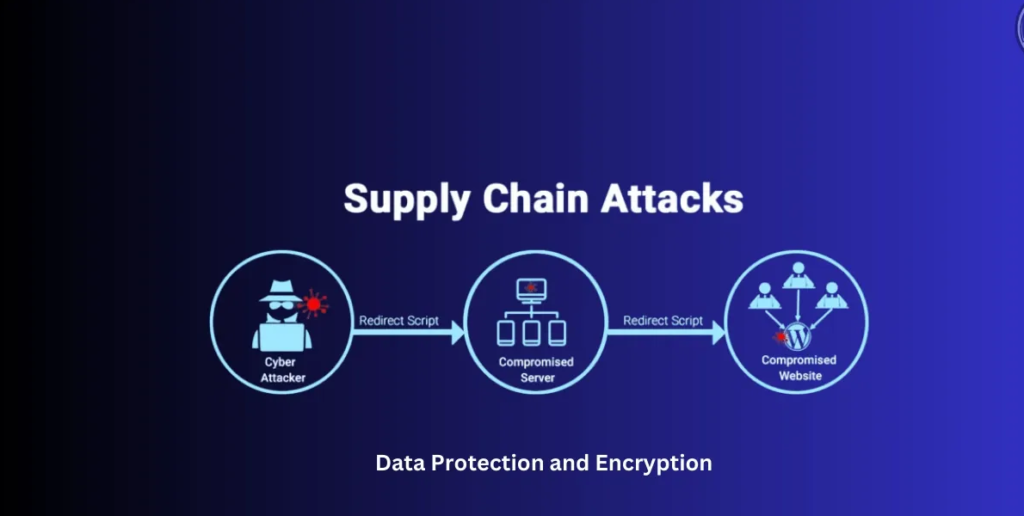
Modern websites pull in a lot of external code: analytics scripts, chat widgets, ad networks, and social media embeds. If any of those third-party services gets compromised, their script can deliver malware directly to your visitors without anything on your own server being touched.
This is called a supply chain attack, and it is increasingly common. You can have a perfectly hardened WordPress site and still be serving malware through a compromised third-party tag.
Common WordPress Hacking Methods Explained
Understanding wordpress hacking methods is not about becoming a hacker yourself. It is about knowing where to look and what to harden. Here are the attack types you are most likely to encounter:
SQL Injection (SQLi)
SQL injection happens when an attacker inserts malicious database commands into a form field or URL parameter that your site passes to the database without properly sanitising.
If the code does not clean the input first, the attacker can read data, modify records, create admin accounts, or even wipe your database entirely.
This is usually exploited through poorly coded plugins or themes that handle user input carelessly. Well-maintained plugins use WordPress’s built-in database functions that handle sanitisation automatically.
Cross-Site Scripting (XSS)
XSS attacks inject malicious JavaScript into pages that other visitors then load. There are two main types:
- Stored XSS: the malicious script is saved to your database (e.g., in a comment or user profile field) and runs every time someone views that content.
- Reflected XSS: the script is embedded in a link and only runs when a victim clicks it.
XSS can be used to steal session cookies, redirect users, deface your site, or deliver drive-by malware downloads to your visitors.
Brute Force and Credential Stuffing
As mentioned earlier, brute force attacks repeatedly guess passwords. Credential stuffing is more sophisticated: attackers use actual leaked credentials from other breaches. The tools they use can test thousands of combinations per minute against unprotected login pages.
File Upload Exploits
If your site allows file uploads (portfolio submissions, contact form attachments, user avatars), a poorly configured uploader can accept PHP files disguised as images. The attacker uploads a malicious PHP file, then accesses it directly through the browser, giving them code execution on your server.
Remote Code Execution (RCE)
Some plugin or theme vulnerabilities allow attackers to run arbitrary code directly on your server. This is about as bad as it gets. RCE typically gives attackers the ability to install backdoors, modify files, steal data, and use your server to attack other sites.
| DEVELOPER TIP If you are a developer reviewing your own code, always use $wpdb->prepare() for database queries, sanitize_text_field() for input sanitization, and wp_kses() for HTML output. These are your first line of defence. |
Signs Your WordPress Site Has Been Hacked: WordPress Malware Signs
Spotting the wordpress malware signs early can limit the damage significantly. Some are obvious. Others are subtle enough that site owners miss them for weeks.
Visible Signs
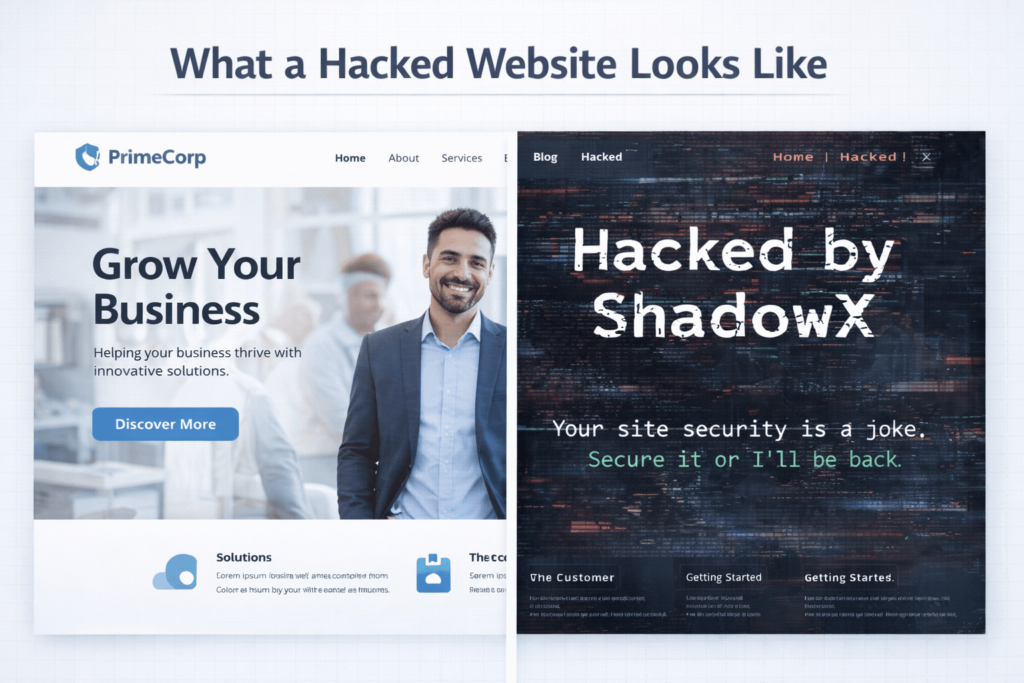
- Defacement: your homepage or other pages have been replaced with content from attackers (often political messages or hacking group callouts).
- Spam content: pages selling pharmaceuticals, counterfeit goods, or gambling services have been injected into your site.
- Unexpected redirects: visitors are being sent to completely different websites when they land on your pages.
- Google warnings: Google Search Console is flagging your site for malware, and browsers show red warning screens to visitors.
Subtle Signs
- New admin accounts: accounts you did not create have appeared in your Users list.
- Modified core files: WordPress core files like wp-login.php, index.php, or files in wp-includes/ have been altered.
- Strange outbound requests: server logs show your site making requests to unfamiliar external domains.
- Performance drops: your site has suddenly become very slow without any changes on your part (often caused by crypto-mining scripts or outbound spam being sent from your server).
- Hosting suspension: your host has suspended your account due to sending spam email or malicious traffic.
Backdoors
Backdoors are hidden access points left by attackers after the initial breach. They can look like legitimate PHP files in your uploads folder, obfuscated code added to functions.php, or modified plugin files. Even after cleaning visible infections, backdoors allow attackers to re-enter at will.
Common locations to check: /wp-content/uploads/ (should never contain PHP files), /wp-content/plugins/ (look for files with random names or recent modification timestamps), and your theme’s functions.php and header.php files.
WordPress Security Audit Checklist: A Step-by-Step Review
Running a wordpress security audit checklist does not need to be overwhelming. Here is a structured approach you can follow even without deep technical knowledge:
- Check your WordPress version. Go to Dashboard > Updates. If you are not on the latest version, update now. WordPress core updates frequently patch critical vulnerabilities.
- Audit your plugins. Go to Plugins > Installed Plugins. Deactivate and delete any you are not actively using. Update all remaining plugins. Check each one on WPScan.org for known vulnerabilities.
- Audit your themes. Keep only your active theme and its parent theme (if applicable). Delete everything else. Update your active theme.
- Review user accounts. Go to Users > All Users. Remove any accounts you do not recognise. Change the role of any accounts that have admin access but do not need it.
- Check file permissions. Key permission targets: wp-config.php should be 440 or 400. The wp-content directory should be 755. Individual files should be 644.
- Look for PHP files in the uploads folder. This folder should only contain media files. Any .php file in /wp-content/uploads/ is a red flag.
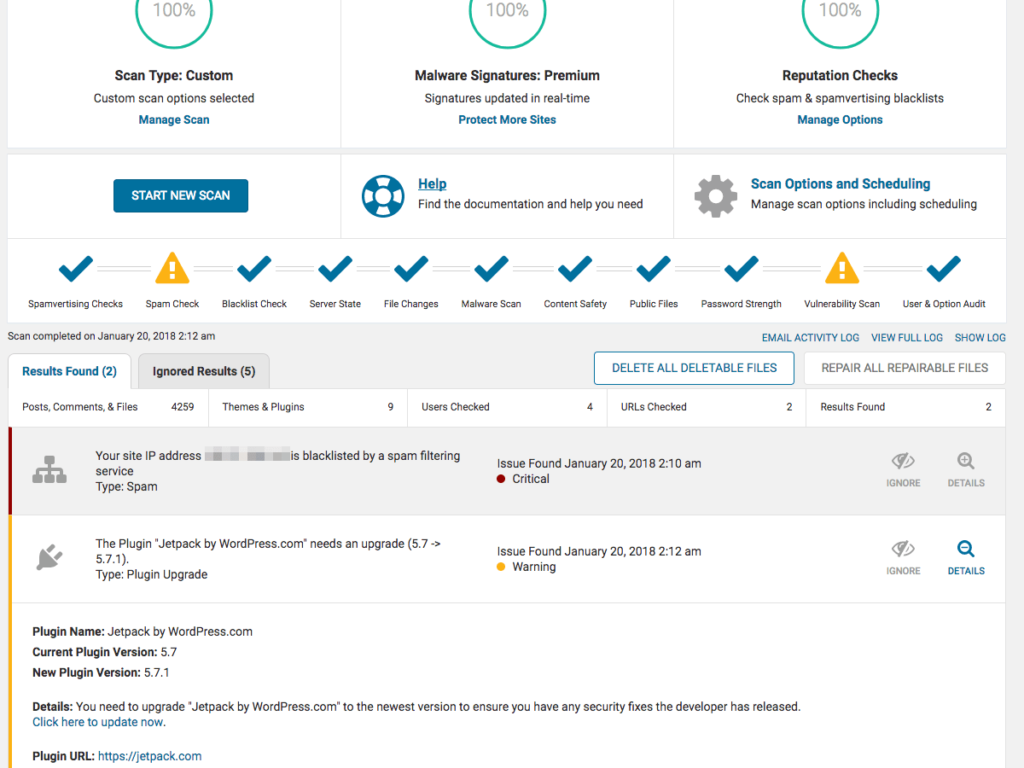
- Scan with a security plugin. Run a full malware scan using Wordfence, MalCare, or Sucuri. Review every flagged file carefully.
- Check your .htaccess file. Open this file (in your site root) and look for code that was not there before, particularly redirect rules pointing to external domains.
- Review wp-config.php. This file contains your database credentials. Make sure it has not been modified and is not publicly accessible.
- Check Google Search Console. If you have not set this up, do it now. Google will notify you of manual actions, malware detection, and crawl issues.
Essential WordPress Security Tools
Good wordpress security tools do not replace sound practices, but they make implementing and monitoring those practices a lot more manageable. Here are the ones worth knowing:
Wordfence Security
Wordfence is one of the most popular wordpress security tools available. It includes a web application firewall (WAF), malware scanner, login security features, and real-time threat intelligence. The free version is solid. The premium version adds real-time rule updates and country blocking.
Sucuri Security
Sucuri offers both a free plugin for monitoring and a paid platform that includes a cloud-based WAF and CDN. Their malware removal service is particularly well-regarded for post-hack cleanup.
MalCare Security
MalCare is known for its one-click malware removal feature and its focus on scanning without impacting server performance. It runs scans on its own servers rather than yours.
WPScan
WPScan is a command-line vulnerability scanner built specifically for WordPress. It is commonly used by developers and security professionals to test their own sites. There is also a free API and a web-based version available at wpscan.com.
iThemes Security (now Solid Security)
Formerly iThemes Security, Solid Security focuses on hardening common WordPress attack surfaces: brute force protection, file change detection, two-factor authentication, and database backups.
UpdraftPlus (Backups)
Not a security scanner, but arguably the most important tool on this list. UpdraftPlus automates backups to remote storage (Google Drive, Dropbox, Amazon S3, etc.). A clean, recent backup is the fastest path out of a major compromise.
| IMPORTANT Do not store your backups on the same server as your website. If an attacker gains access to your server, they can delete your backups. Always send backups to an off-site location. |
How to Prevent WordPress Website Hacking: Core Hardening Steps
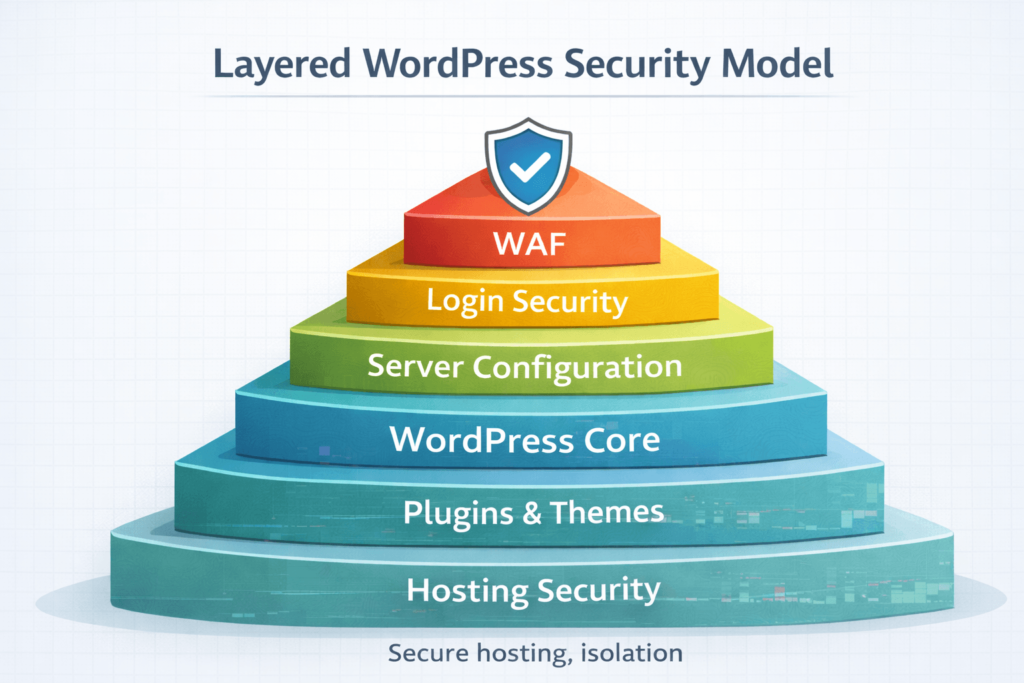
Knowing how to prevent WordPress website hacking comes down to layered defences. No single measure makes you bulletproof, but combining several significantly raises the cost of attacking your site to the point where automated bots move on.
Keep Everything Updated
WordPress core, plugins, and themes should be updated as soon as updates are available. Enable automatic background updates for minor WordPress core releases. For major releases, test on a staging environment first. Check our WordPress Maintenance Service.
Use Strong, Unique Passwords and Two-Factor Authentication
Every admin account should have a strong, unique password (not reused from any other service). Add two-factor authentication using a plugin like WP 2FA or Google Authenticator. This alone stops the vast majority of credential-based attacks.
Limit Login Attempts
Plugins like Limit Login Attempts Reloaded or WP Cerber add rate limiting to your login page. After a set number of failed attempts, the IP gets temporarily blocked.
Change the Default Admin Username
If your WordPress username is still “admin”, change it. Create a new admin account with a different username, log out, log in with the new account, and delete the old “admin” user (assigning its content to the new account).
Disable XML-RPC Unless You Need It
Add the following to your .htaccess file to block access to xmlrpc.php:
<files xmlrpc.php> order deny,allow deny from all </files>Move wp-config.php Up One Directory
WordPress will look for wp-config.php in the directory above your web root. Moving it there makes it inaccessible directly from the browser, removing one attack surface.
Use a Web Application Firewall (WAF)
A WAF filters malicious traffic before it even reaches your WordPress application. Wordfence and Sucuri both offer WAF solutions. Cloudflare also offers WAF capabilities at both free and paid tiers.
Run Regular Backups
Set up automated daily backups stored off-site. If you are ever compromised, a clean backup from before the infection is the fastest and cleanest recovery path. UpdraftPlus and BlogVault are both solid options.
When to Call in the Experts
There are situations where the DIY approach is not the right call. If your site is actively compromised and you are not comfortable working with PHP files, server logs, and database queries, attempting a manual cleanup can make things worse.
Signs it is time to bring in professional help:
- Your security plugin found malware but the removal keeps failing or the infection returns.
- Your hosting provider has suspended your account due to malicious activity.
- You have cleaned the site but it is still being flagged by Google or antivirus tools.
- You found a backdoor but are not confident you have found all of them.
- Your site handles sensitive customer data and the stakes are too high to experiment.
| Need Professional Help With a Hacked Site? The team at CodeCaste handles WordPress security cleanups, hardening, and ongoing maintenance. If your site has been compromised or you want to make sure it never is, we are happy to help. |
| Get in touch: https://www.codecaste.com/contact-us |
Frequently Asked Questions
1. How do I know if my WordPress site has been hacked?
The most common signs include unexpected redirects sending visitors to other websites, new admin accounts you did not create, Google warnings appearing in search results, your hosting provider suspending your account, or a sudden and unexplained performance drop. You can also run a scan using Wordfence or Sucuri to detect malicious code even if nothing is visually obvious yet. Many infections run silently in the background for weeks before they become visible.
2. What is the most common way WordPress sites get hacked?
Outdated plugins are the single most common attack vector. Attackers scan the web for sites running plugins with known vulnerabilities and exploit them automatically. Weak passwords and brute force attacks are a close second, particularly on sites that still use the default ‘admin’ username. Keeping plugins updated and using strong passwords addresses the majority of real-world attacks.
3. Can a hacked WordPress site be cleaned?
Yes, in most cases a compromised site can be cleaned. The key is being thorough: you need to remove all malicious files, close the vulnerability that allowed the attack, change all credentials, and verify no backdoors remain. Many site owners clean the visible infection but miss a hidden backdoor, which allows re-infection within days. For sites handling sensitive data or high traffic, professional cleanup is strongly recommended.
4. Does WordPress have built-in security?
WordPress includes some basic security features: password hashing, nonce verification, prepared database statements, and regular core security patches. However, it does not ship with a firewall, malware scanner, or login protection out of the box. That is why additional security plugins and server-level configuration are essential. Security is a shared responsibility between WordPress core, your plugins, your host, and your own practices.
5. How do hackers use WordPress plugins to break in?
Vulnerabilities in plugins allow attackers to execute malicious actions without needing your password. Common plugin-based attacks include SQL injection (injecting database commands through unprotected input fields), stored cross-site scripting (injecting JavaScript that runs in visitors’ browsers), and unauthenticated file uploads (uploading malicious PHP files that execute on your server). Attackers find these vulnerabilities through public databases like WPScan.org and NVD and then scan for sites running the affected version.
6. How long does it take to recover from a hacked WordPress site?
Recovery time depends heavily on how quickly the attack was detected and how severe the infection is. A straightforward plugin-based infection caught early might be cleaned in a few hours using a tool like MalCare or Sucuri. A deep infection involving backdoors across multiple directories, database injection, and a compromised admin account could take a full day or more to thoroughly resolve. Restoring from a clean backup is often the fastest option if a recent one is available.
7. Is managed WordPress hosting more secure?
Generally, yes. Managed WordPress hosting providers like WP Engine, Kinsta, and Flywheel offer server-level firewalls, automatic core updates, malware scanning, and isolated hosting environments. The trade-off is cost: managed hosting is more expensive than shared hosting. But for business-critical sites, the additional security and reduced management overhead are usually worth it.
8. Should I use more than one WordPress security plugin?
Usually not. Multiple security plugins often conflict with each other, can cause performance problems, and frequently duplicate the same functionality. Pick one comprehensive solution (Wordfence, Sucuri, or MalCare are the most commonly recommended) and configure it properly rather than stacking multiple tools. The exception is using a dedicated backup plugin like UpdraftPlus alongside your security plugin, since backups serve a distinct function.
The Bottom Line
Getting a site hacked is not a reflection of how tech-savvy you are. Attackers use automated tools that move faster than any human can keep up with manually. The goal is not perfection. It is making your site a harder target than the one next door.
Here is what to take away from everything covered above:
- Update everything, regularly. WordPress core, plugins, and themes. Set a weekly reminder if you have to.
- Reduce your attack surface. Delete unused plugins and themes. Disable xmlrpc.php if you do not need it. Remove default admin accounts.
- Use strong credentials and two-factor authentication. This alone stops a huge proportion of attacks.
- Install a reputable security plugin. Wordfence, Sucuri, or MalCare are solid starting points. Configure them properly and actually review alerts.
- Run automated backups to off-site storage. A clean backup is your best recovery option if something does go wrong.
- Run a security audit periodically. Use the checklist in this guide to review your site’s posture every few months.
- Know when to get help. If a cleanup is not sticking or the stakes are high, bring in people who do this professionally.
WordPress security is not a one-time setup. It is an ongoing practice. The sites that stay clean are the ones where someone is actually paying attention. Start with the basics, layer in the tools, and audit regularly. That is the whole game.
Want Someone Else to Handle This?
At CodeCaste, we handle WordPress security audits, malware cleanup, and ongoing hardening for businesses that cannot afford downtime or data exposure. If you would rather spend your time running your business than worrying about whether your site is secure, let us take care of it.
Reach out anytime: https://www.codecaste.com/contact-us